As I watch all my customers leaves Notes/Domino behind, all I can do is try and assist as best I can. As part of this process I've found myself creating a Notes-to-SQL export tool.

The tool is Notes-based and involves the following three part process:
Step 1. Loop through and analyse every single document in the target database and build a list of all unique combinations of Form + Field + Data-Type. For each combination it finds, a Notes document is created which lists the Form name, the Field name and the type of data (text, Authors, Rich Text, Numbers etc)
The resulting list is then analysed and any duplicate fields (conflicting data types) or unnecessary fields are removed.
Step 2. Taking the results of step 1 it then builds the SQL tables (using the document's UNID as the table's primary key). For each form it creates a table of the same name. For each field related to that form it creates a column in the SQL table with the equivalent data type.
Step 3. Finally, step 3 populates the SQL tables with data by once again looping ALL documents in the database and exporting each document to a new row in SQL according to the map of form-fields we've decided on.
Once it's done we can then go in to SQL and define relationships between parent/child document by joining the tables in a Database Diagram. Although as an enhancement to the tool it could be a part of the export process that we define these rules.
As part of the initial configuration of the tool you can tell it which Forms to ignore, which fields ignore, which fields to always treat as UNIDs etc.
Once the data is in SQL then you can do the T and L of the ETL process.
Attachments?
For attachments there's a special table called Files which stores the UNID and filename of any files found during the export. These files are detached to disk and the path to them stored in the "Files" table. For any given row of any of the SQL tables you can find the associated attachments by looking in the Files table for a matching UNID.
Taking it To Market?
I've always known I need a product to sell. Could this be it? It's some way off being ready to sell directly off the shelf. However, with some support from yours truly I reckon it could be used in most situations or tailored to work where it doesn't quite fit.
If you're interested in using the tool to migrate data from Lotus Notes to SQL Server (or any other RDBMS system) then drop me a line on jake.howlett@rockalldesign.com.
 There are 27 comments in 14 threads Read - Add
Back in March I updated you all on how my on-going quest for the perfect desk was coming along. Here now is another update.
Question: Can you ever have too many monitors or enough "real estate" desktop size?
Answer: No!
Here's how my desk looks now:
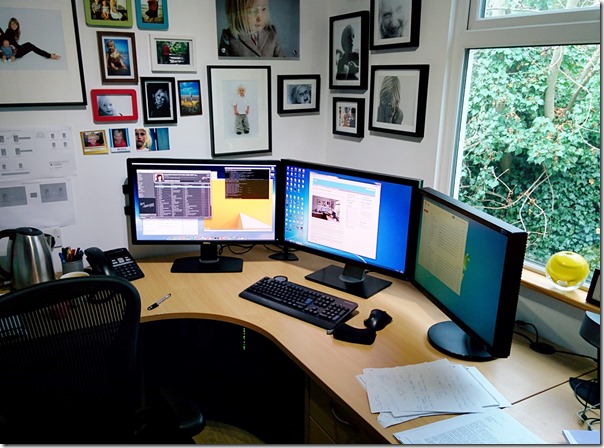
From left to right, there's a (newly-added) Dell U2713H (showing OS X), a Dell U2711 and a Samsung SyncMaster 245B (both showing the same Windows 7 PC). All in there are 9,676,800 pixels glaring back at me!!
Aside from adding a brand new monitor (which, by the way is amazing and I can't recommend it enough) the main difference is that there is only one keyboard and mouse, which shared between Win and Mac using Synergy KM.
Synergy is brilliant and, again, I can't recommend it enough. It's been recommended to me on here previously, several times. Why oh why I didn't try it out before I don't know. Well, I do. It's because I don't like the idea of having to run daemons on my PCs. Which is a stupid reason and I'm so glad I saw sense.
It's like a kind of magic seeing your mouse move from Windows to Mac without even the slightest hint of a lag. For the first day or so I'd just keep needlessly moving between the two just to watch it happen. After a while it's almost possible to start thinking of them both as the same PC!
The mouse itself has to move about 3" to travel between the extremities of all three screens!
I use the Mac Mini for video editing, the occasional PHP coding (Coda 2) and for running various versions of Windows inside Parallels virtual machines for testing sites in different versions of IE. Until now, using the Mac wasn't great. The monitor was small and attached square to the wall. To use for any length of time meant moving one keyboard out the way, moving over the other and re-positioning my chair. The old monitor was also too small to do OS X justice or for any kind of effective video editing. All those issues have now been resolved.
is it my perfect desk though? No! But it's, way, way, way better than before. Not perfect though. The quest continues...
There are 6 comments in 5 threads Read - Add
My sis-in-law loves a bargain (she's from Yorkshire!) and recently rang to ask me (via her sister, my wife) if I'd be able to recover a laptop she'd been offered, before she went ahead and bought it.
Apparently the owner of the laptop had forgotten the Windows password and had written the laptop off as worthless, so was willing to sell for next-to-nothing. I said yes, I'd able to do something with it.
What I didn't realise was that it might have a BIOS password, which it did!
Initially I'd thought it would be as simple as sticking in a Windows install CD and building from scratch. However, without the BIOS password I couldn't change the boot order of the disks to get it to boot from CD.
I tried Google and there's lots of complicated hacks out there, as well as BIOS removal tools for sale. None of the hacks worked for me. Nor did stripping the laptop down to hot-wire jumpers or remove the CMOS battery (which was un-removable).
Then I had a brainwave.
The Simple, Fool-Proof Solution
If you find yourself wanting to boot from CD on a laptop (or PC for that matter) where you can't modify the BIOS try this:
- Remove the hard drive
- Insert the Windows install CD
- Start the laptop
- Hope that BIOS fails-over to the CD after not finding a hard drive
- If it boots from the CD, while that's happening, quickly re-insert the hard drive.
- By the time Windows is ready to install the hard drive will be there
- Remove the old disk partitions and start afresh
Hey presto. Worked for me. Hope it helps somebody else.
There are 7 comments in 2 threads Read - Add
Rockall Design ltd (the little company I run from the office-slash-garage in my garden) was 10 years old yesterday. It's customary on this day each year that I plot a chart of turnover growth over the years. So, here it is:
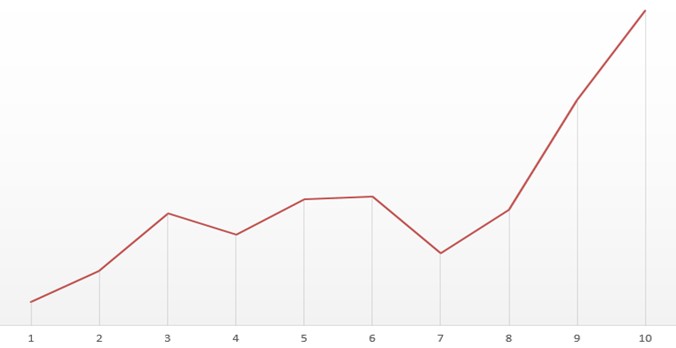
As you can see it's been a bumper year.
Last year I put down what, at the time, I thought was a good year to:
Long hours and 'hard' work. But mainly luck!
This year is much the same. Although, if I thought I was doing long hours back then I had no idea what was in store this past year.
I was reluctant to show the chart as it may seem like I'm showing off and nobody likes a show off (note however that I leave the actual number involved a mystery). Suffice to say, I would have posted the chart no matter which direction the line would have gone this year.
At What Cost Success?
I hear people talk about this thing called a work/life balance, whatever that might be. It's gotten to the point for me now where all I seem to do is work. Not only that but, when I'm not working, it's work that I'm thinking about and I find it hard to switch off. Luckily I love what I do. But there are other things I love. My family being top of that list.
I used to have a self-imposed rule of not working at the weekend. Lately even that golden rule has gone out the window.
People sometimes say to me "I'd love to work from home" or "It must be great being your own boss". At which point I normally snap up the chance to poor my heart out about the loneliness and how you're never your own boss. You will always have a boss and answer to somebody.
Once upon a time I had a group of friends I saw regularly and had a few hobbies I enjoyed.
Then there's this website! What happened there?! Well, if you turn my company growth chart upside down, it could just as well be a plot of the number of readers this site has had over the years. As my takings have shot up over the last couple of years the readers of this site have plummeted.
I'm overdoing it on the moaning though. In reality I'm happy with how things are. I'm earning more money than I ever dreamt possible. I know it won't/can't continue and I'm making sure I make as much hay as I can while the sun's shining. Being self-employed means I have to provide for my own retirement. I'm not greedy or obsessed by money, but it would be crazy for me not to take the opportunity to capitalise on any chances I'm given to earn.
Still Domino?
I'm sure the question on everybody's lips (well, at least on those of the people who've not stopped reading the site) is "what technology is earning your crust just lately?".
This time last year I said it was Lotus Domino that was responsible for most of Rockall's turnover. This year however the picture has changed and, whilst Domino is still in the equation, it's now Microsoft Dynamics CRM and ASP.Net MVC that I'm working with.
Whether Dynamics CRM remains in the picture long term or not I don't know. It certainly feels like it's got a brighter (more lucrative) future for it than Domino does. It's an interesting product and hopefully I'll find time to write about it here soon.
Right, back to work. So much to do....
There are 16 comments in 14 threads Read - Add
The font-based web icons from Font Awesome is brilliant. Especially when used in conjunction with Bootstrap. You can quickly and easily add any one of the icons to your HTML buttons (or many other elements for that matter). Like so:

Sometimes though, you can't use web fonts. Either you can't rely on them being supported or, for some other reason, you just want to use an image file.
That was the case for me recently and I wanted an image file of an exclamation mark. Here's how easy it was using Font Awesome and Adobe Fireworks to create images based on font icons.
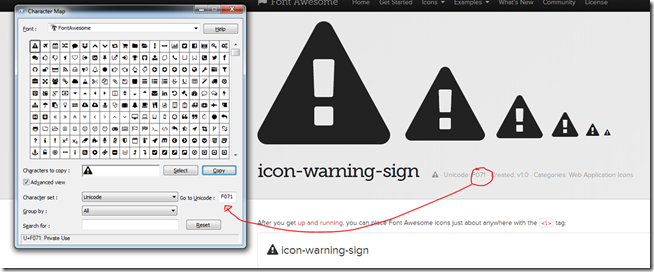
First step is to download and install the Font Awesome font to your PC. Then open the Character Map program and select the Font Awesome font, as below:
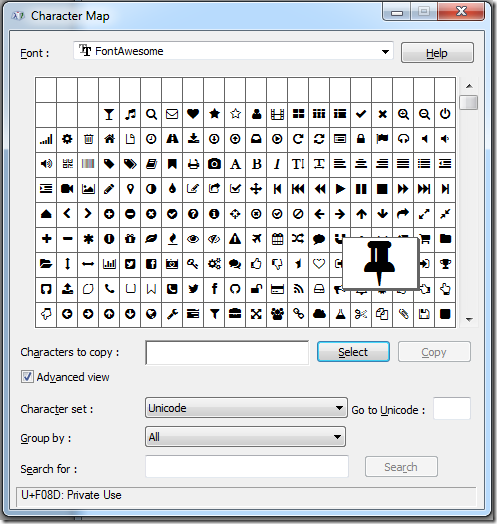
In there you can view, select and copy any one of the icons. With it copied to the clipboard, you can then switch to Fireworks, start a new canvas, select the Text tool (or press "T"), click on the canvas somewhere and paste in the icon. You can then resize and re-colour as you wish, as below:
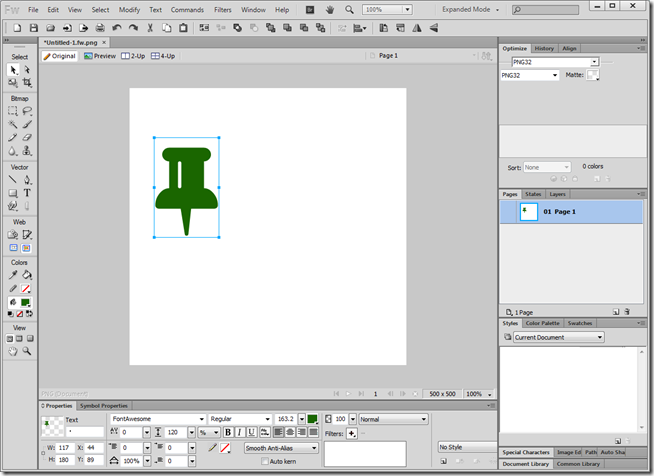
Note that Fireworks is a vector-based drawing app and you can break apart (Ctrl+Shift+P) the icons so that you can re-define their shape by dragging corners and points around, like below, where, for no particular reason, I've made the point wider:
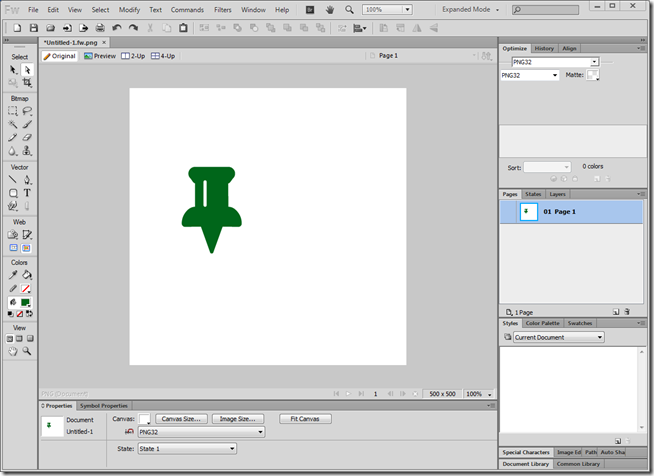
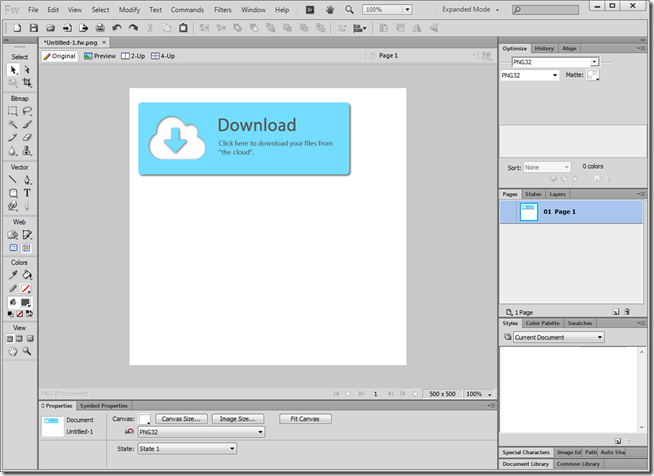
The only limit is your creativity (or lack thereof, as shown here). Hey, look, I made a download button with a picture of a cloud in it:
If you get stuck trying to find the icon you want from within Character Map then here's a tip that may help. Find the icon on the website and on there they show you the Unicode code, which you can type in to Character Map to find the icon, as below.
Have fun!
Future of Fireworks
Fireworks is brilliant. Why of why Adobe have decided to scrap it I don't know. I only hope it either goes open source or the version I currently own keeps working for as long as I have need of a graphics tool.
There are 4 comments in 2 threads Read - Add
More blog entries are available in the archive »

 Darryn Sullivan on
  wUmrLVWz on