
Flex App Basics 7: Alert Is To Flex as MessageBox Is To LotusScript
If you look at again at the Contact Manager app you'll see I added context menus to the View, as below, where you can see an edit and a delete option for each row:
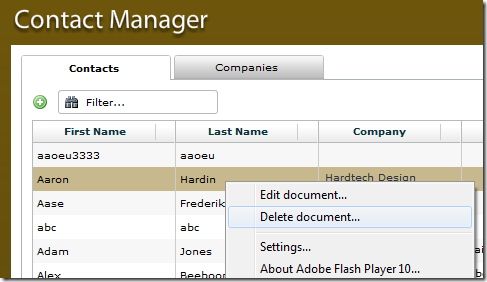
The edit option simply dispatches the View's custom "openDocument" event back to the parent application, which is where we handle opening the document.
For now the delete option is handled by the View object itself. Although it doesn't work yet I added it in as an example of using the Alert object for more than a simple "Ok" message. As you can see below if you choose the delete option you see an "advanced" Alert.
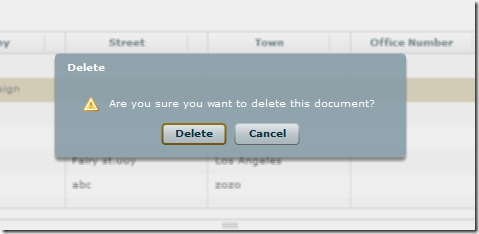
How did I do this?
Until yesterday I'd assumed that the flex Alert did nothing more than show a popup prompt with a message and an Ok button.
I presumed that, to do anything like asking a Yes/No question, it would involve creating custom components based on the TitleWindow. Doh. Turns out that Flex's Alert is akin to LotusScript's Messagebox. Here's the code for the above delete confirmation prompt:
Alert.yesButton="Delete";
Alert.noButton="Cancel";
Alert.show(
  "Are you sure you want to delete this document?",
  "Delete",
  Alert.YES|Alert.NO,
  this,
  function(event:CloseEvent):void{
    Alert.show("You pressed " + ((event.detail==Alert.YES)?"delete":"cancel"));
  },
  IconLibrary.WARNING_ICON
);
Notice that before we show the Alert we've changed the labels on the yes and no button. So, in fact it's a bit more powerful than Messagebox ever was.
I can't believe I got this far with Flex without realising this. Things just got a lot easier.
Download?
The download of all the code will come at some point. Be patient. There's just a bit more I want to squeeze in there first.
If you really want a pre-release version then visit my Amazon Wishlist and I'll send a copy over.


 Skip to the
  You can subscribe to an individual
Man, you were deleting the COOLEST contact in the list! ouch!!! :)
That is sweet though, I dont think I've seen it before either. There you go, showing Codestore ahead of the curve.
Reply
That's good to know Jake, thanks. Now you're looking at deletions I could envisage in the real world users wanting to be able to multi-select records to delete. How would you do that in Flex - checkboxes next to each row or can you enable shift or control to multi-select?
Also - how about doing a 'Flex basics' on the charting functionality?
Reply
nice!!!
Reply
I got one problem...
Suppose my message text is very long spanning 25 lines or more then message text exceeds the message box frame and it looks like hanging in mid air. How can I control message box dimensions?
Reply
Hi Kunal,
Maybe try using a custom component based on the TitleWindow and add the ok/cancel button in the ControlBar area of the titlewindow?
http://livedocs.adobe.com/flex/3/html/help.html?content=layouts_12.html
Or you could just make the message shorter ;-)
Jake
Reply
Hey,
a great Contact Manager... How did you put the small icons (star) into the Datagrid??? Very Very very cute!
I hope u read this comment and answer my little question!
Greetings from Germany,
Caro
Reply
Hi Carol,
See here: http://www.codestore.net/store.nsf/unid/BLOG-20100203-0300
Reply
Hi,
I need somthing like click the button and a message box will appear and after sometime it will disappear.
like MS-Out look mail.
Help me..
Regards
Suvra
Reply
Something like this? http://www.markbarton.com/?p=162
Reply